Connect to the Bitsaga node
August 24, 2026 · Point your wallet at our Bitcoin node over Tor. How to connect, and what you give away by doing it.
Someone asked at a meetup whether they could connect their wallet to our node. The answer used to be no. Now it is yes. Free, no account, nothing to sign up for.
How to connect
The address:
aizmev3n7m2hffq7z4a5iei4yc5towwcvautuxeoseqgct5qcju5hiid.onion:50001Sparrow
Open Sparrow → Preferences → Server. The panel looks like this, and these are the only five things you touch:
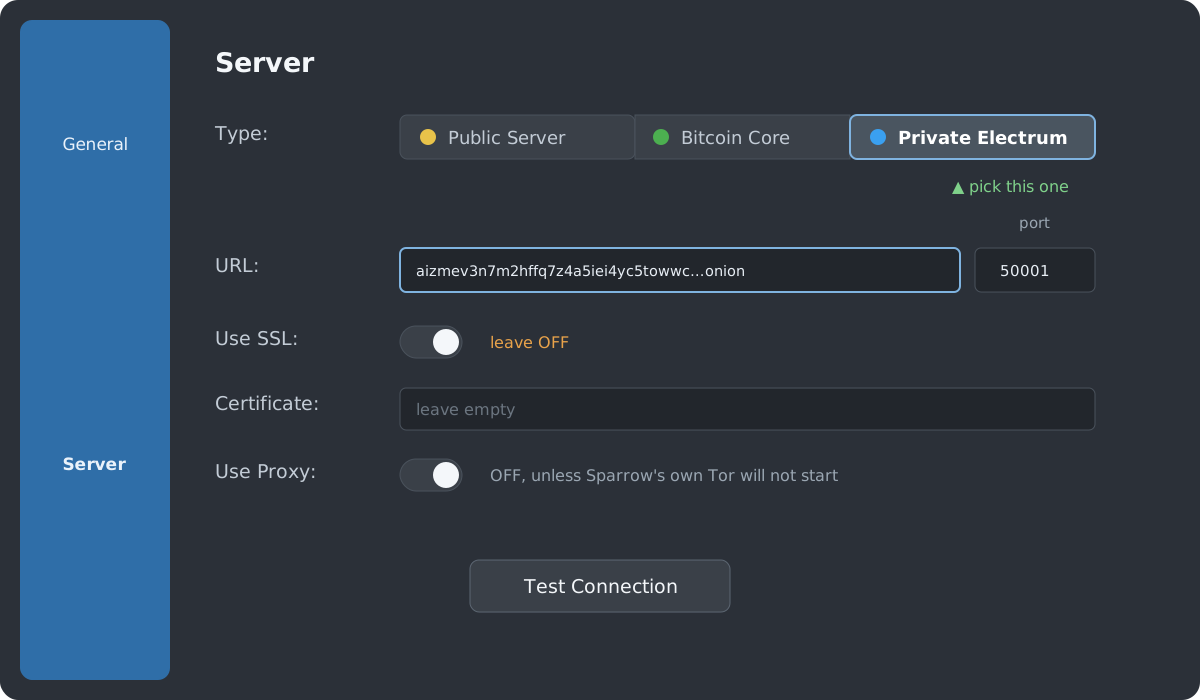
- Type: three buttons across the top. Click Private Electrum, the one on the right. Not Public Server, not Bitcoin Core.
- URL: paste the onion address. Just the address, with no
http://in front and no:50001on the end. - Port: the narrow box to the right of the URL. Put
50001there. - Use SSL: leave it off. Tor already encrypts the connection, so there is no certificate to check. Turning it on will fail.
- Certificate and Use Proxy: leave both alone. Sparrow ships
its own Tor and uses it automatically for a
.onionaddress.
Then press Test Connection.
If Sparrow's Tor will not start
Some networks block Tor. You will see it in the log box at the bottom of that same panel,
saying something like "Problem bootstrapping. Stuck at 14% (handshake)" with
CONNECTRESET repeated. That is your connection to the Tor network failing, before
our server is ever reached, so nothing you change in the fields above will help.
The usual fix is to install Tor separately, let it run in the background, then turn
Use Proxy on and set the proxy to 127.0.0.1 port 9050.
If your network blocks Tor outright, you will need bridges, which the Tor Browser can set up
for you.
Electrum
Tools → Network, tick the proxy box and set it to 127.0.0.1:9050,
then add the server as <address>:50001:t. The trailing t means
plain TCP, which is the same "no SSL" choice as above.
Anything else
Any wallet that lets you set a custom Electrum server and route over Tor works the same way: the address, port 50001, no SSL.
Two things to expect: it is a little slower than a clearnet server, and there is no uptime promise. Keep a second server configured as a fallback.
What you give away
Your wallet does not download the blockchain and search it privately. It asks a server about your specific addresses. So whoever runs that server can work out your balance, your history, and which addresses belong to you.
Tor hides your IP. It does not hide any of the rest.
| Where your wallet points | Who learns your addresses |
|---|---|
| Your own node | Nobody |
| Our server, over Tor | Us, but not your IP |
| Your wallet's default | A company, usually with your IP |
So: better than the default your wallet shipped with, worse than your own node. If you are choosing between us and a company you never picked, use us. If you can run your own, run your own.
Better: run your own
Everything above is a workaround for not having your own node. Owning the server is the only setup where nobody learns anything, and you do not have to trust us.
You can build one yourself on any machine you leave switched on. If you would rather it just worked, we sell the Start9 Server One, a plug-in Bitcoin node that runs its own Electrum server and connects to your wallet over Tor exactly like ours does, except it is yours.
Not sure you need one yet? Start with a SeedSigner instead. Keys first, node second.