The SeedSigner project is unusually honest about where its security actually comes from. In their own words:
The foundation of SeedSigner's security model relies on users taking on the responsibility to ensure they are running valid software. Because we use off-the-shelf parts, the hardware will run any code that you load on it.
That is exactly right, and it is the part most people gloss over. A SeedSigner is a Raspberry Pi with a screen. It has no secure boot, no vendor lock, and no opinion about what you put on the card. The device does not know whether the software on it came from the project or from someone who tampered with your download. The only thing standing between those two situations is you, checking.
So how do you check? Here are the project's own instructions, and I want to quote the assumption they make, because it is the whole subject of this article:
We assume you are running the commands from a computer where both GPG and shasum are already installed and that you also know how to navigate a terminal.
Read that again with a normal customer in mind. Someone who has just bought their first hardware wallet, who is nervous about doing this correctly, and who has never opened a terminal in their life. We have just told them that the security of the device they paid for depends on a step whose instructions open by assuming they are a developer.
People do not do the step
They do not do it because it is unreasonable to expect them to. The honest version of what happens is this: they download the file, they see a wall of commands, they decide it is probably fine, and they flash it. The verification step becomes a thing that exists in documentation rather than a thing that happens.
And a security step that people skip is not a security step. It is a disclaimer.
I sell these devices, so this is my problem more than most people's. If a customer skips verification, the fact that the instructions existed is not much comfort to either of us.
What I built
verify.bitsaga.be does the same check, by dropping a file onto a page.
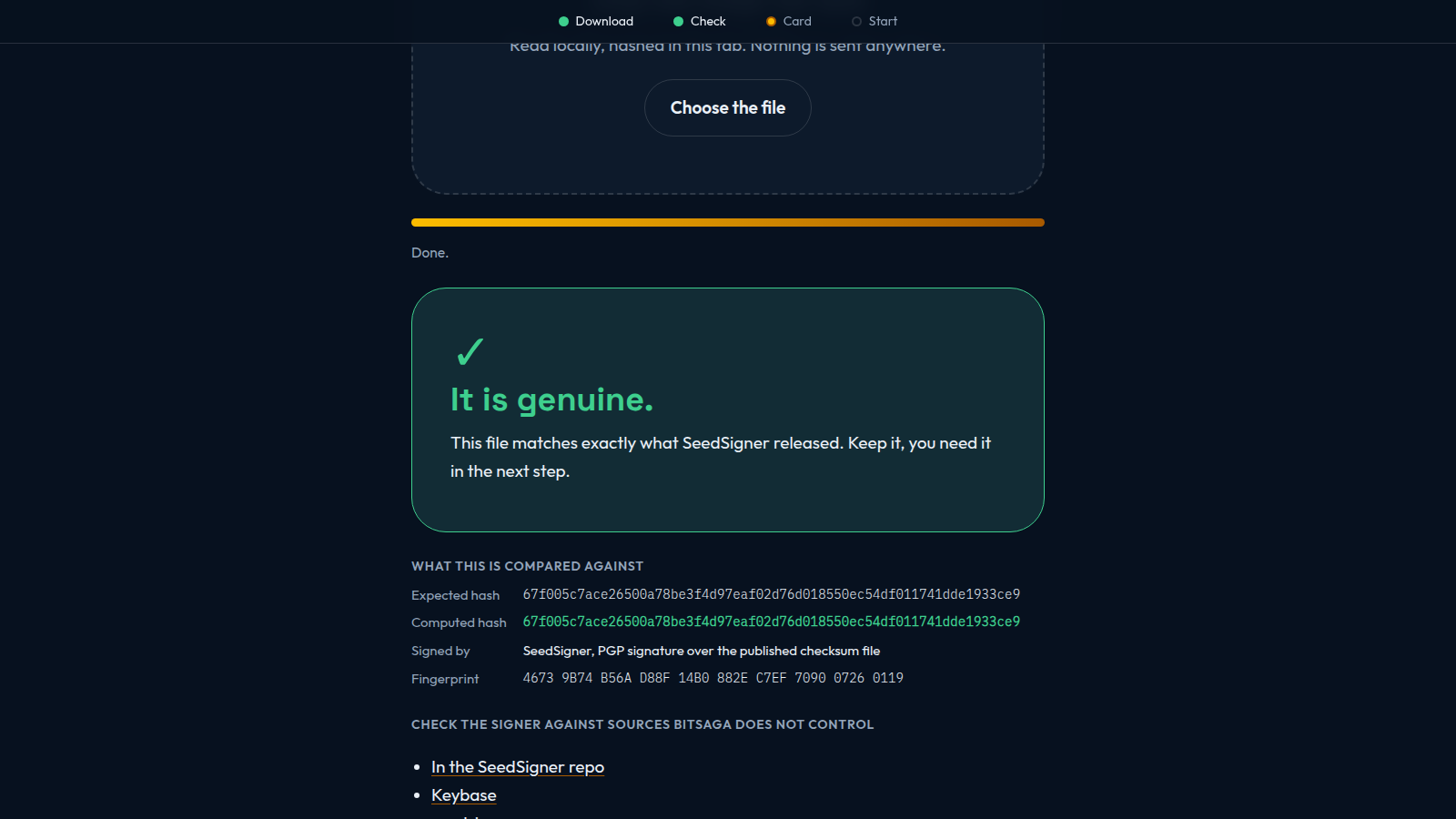
You pick which model you have, you click the download button (which sends you to SeedSigner's own GitHub, not to us, because we host no firmware and never will), and then you drag the downloaded file onto the page. It reads the file inside your browser, computes its SHA-256, and compares it against the hash the project published. Green means it matches. Red means stop, and the next step stays locked so you cannot carry on by accident.
Nothing is uploaded. The file never leaves your computer, and the page makes no requests to any other server, sets no cookies, and contains no tracking code. It is a few hundred lines of plain HTML, CSS and JavaScript with no dependencies, no framework and no build step, so anyone can read the whole thing in about twenty minutes and see for themselves.
About fifteen minutes, start to finished card, without typing a command.
The part where I tell you not to trust it
Here is the uncomfortable bit, and I would rather say it myself than have someone else point it out.
A page that gives you the expected hash and then tells you your file matches it cannot prove anything to someone who does not already trust the page. If someone controlled verify.bitsaga.be, they could show you a green tick for a file that was never SeedSigner's. That is a circle, and no amount of careful code inside the page escapes it.
So the page does not pretend otherwise. It has three modes, and the difference between them is a single question: who do you have to trust?
- Easy. Bitsaga. The page checks the file and you take its word for it. Four steps, no jargon, one thing to do at a time.
- Advanced. SeedSigner. Every value is shown: the computed hash, the expected hash, the signing key fingerprint, and links to the places that key is published which are not under our control, so you can compare rather than trust.
- Cypherpunk. Nobody. The terminal commands to do the whole thing without the page, and the Docker one-liner to rebuild the firmware from source and derive the hash yourself.
That last one matters more than it might look. SeedSigner's builds are reproducible, which means the hash is not something anybody has to vouch for. You can derive it from the source code. That is the strongest link in the entire chain, and it is the reason this page is a guide rather than an authority.
Cypherpunk mode also sells you nothing. No booking link, no shop link. If you are the sort of person who reads that mode, you did not come for an offer.
What it still cannot do
Software cannot verify hardware. A perfectly checked image on a tampered board is still a tampered board. Verification also says nothing about how your seed was generated or whether the receive address you are looking at is really yours.
There is no version of this that removes trust entirely. Reproducible builds push the boundary a very long way and they do not erase it, because eventually it is the compiler, the processor, or the source code itself. Anyone telling you their product achieves zero trust is selling something. The page says all of this out loud, in the same place it shows you the green tick.
The details, for the people who want them
It covers the Raspberry Pi Zero v1.3 only, since that is the board in every device we ship, and it pins two firmwares: the stock SeedSigner release and the Satochip smartcard fork. Those two are signed in completely different ways, which was the most interesting part of building it. SeedSigner signs a checksum file with PGP. The smartcard fork's maintainer signs the checksum block with a Bitcoin message signature, verified against an address published on his own website, YouTube channel and Reddit profile.
Every pinned value was fetched and checked rather than copied from documentation, and the commands and their output are recorded in the repository so you can repeat them. Verifying that Bitcoin message signature needed a from-scratch implementation, because it uses an Electrum convention that makes several general-purpose tools report a false mismatch. That is in the repository too, in about a hundred and thirty lines of plain Python.
One more thing the page handles, which is not about security at all but generates more support messages than anything else: if you have a SeedSigner Plus, its larger screen is not the firmware's default, and the setting does not survive a reboot unless you switch persistence on first. The page walks you through it, or gives you a two-line file to drop on the card instead.
Take it
The whole thing is MIT licensed and on GitHub. If you sell SeedSigners, fork it and put your own name on it. If you spot something wrong, especially in the pinned values, I would genuinely rather hear about it than not.
If you would like to practise on the device before your hardware arrives, the real firmware also runs in a browser tab. And if you would rather not do any of this alone, I do guided setup calls where we go through it together on a screenshare.
This is an independent project. It is not affiliated with or endorsed by the SeedSigner project, and the smartcard firmware is an independent fork of it. Checking your download is worth doing whether or not you use this page: the official instructions and the project's key on Keybase are the reference, and this page is a ramp to them rather than a replacement.