Read this before you click anything
A browser tab is not a hardware wallet. It has no secure element. It has no air gap. It runs on a general-purpose operating system, inside a JavaScript runtime, next to every other tab and every browser extension you have installed, and it is served by me, an operator you would otherwise never have to trust with anything.
Never type a seed phrase you rely on into this simulator. Not to "just check something". Not once. Everything it holds sits in ordinary memory, is visible in developer tools, and is one screenshot, one swap file or one malicious extension away from somebody else.
If you want a seed to play with, use a public test seed, a throwaway seed phrase that holds no bitcoin and never will. There are published lists of them: their keys are already public, already empty, and already sitting in every Bitcoin test suite in the world. That is the whole point of them. Type one of those.
If you have already entered a real seed: treat it as compromised, generate a new one on a device you trust, and move the funds. Do not weigh the odds.
With that said, here is the thing itself.
What it is
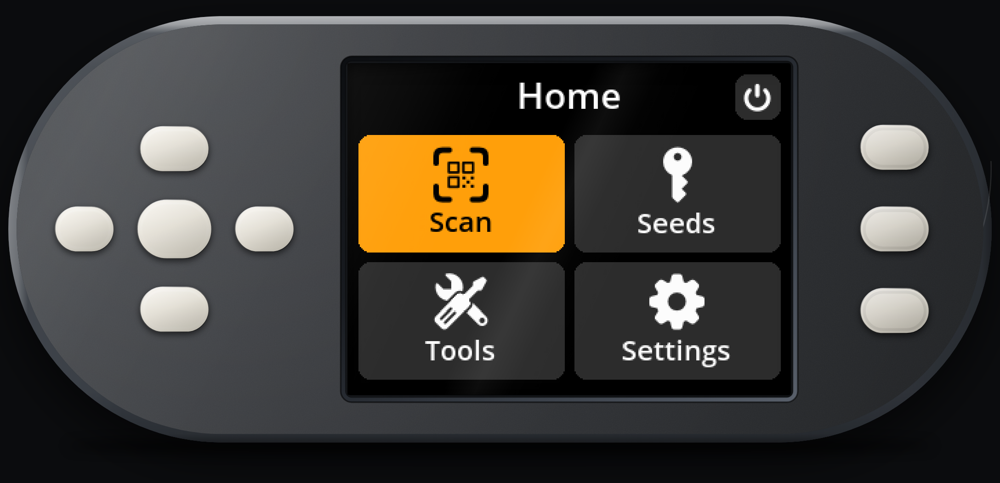
Open bitsaga.be/seedsigner-simulator and you get a SeedSigner. Not a picture of one, not a screen recording, not a re-creation of the menus in HTML. The Python that runs on the device runs in the tab, unmodified, and the wallet's own Controller.start() is what drives it. The menu tree, the seed handling, the passphrase logic, the PSBT parsing, the QR encoders: all upstream's code, doing what it does on real hardware.
The controls: arrow keys move, Enter selects, and 1 2 3 are the three side buttons. You can also just click the buttons on the device drawing, which is the same thing. The first load pulls down about 30 MB of runtime and wallet; after that the page works offline. When you enter a scan screen it will ask for your webcam; point it at a SeedQR and the wallet loads the seed, because that is genuinely the camera path, not a shortcut.
The whole thing is open source and sitting on GitHub at bitsagarob/seedsigner-sim. Everything below is checkable against that repository, and most of it is checkable against nothing else, which is the point.
The hardware it emulates
The SeedSigner the simulator emulates is the smartcard-capable build: the variant with the larger display, a directional pad instead of a joystick, and a card reader that a Satochip SeedKeeper card goes into. It is in the Bitsaga shop now as CardSigner, specifically the 3D-printed enclosure, in black or orange. The CNC-machined aluminium version is CardSigner Premium, on pre-order.
Which is most of the point of putting a simulator up at all: you can find out whether you like the device before anyone asks you for money. Run the flows you would actually run (load a seed, add a passphrase, export an xpub, sign a PSBT, back a seed up as a SeedQR) and decide from that.
How it works
This is the part worth reading even if you never buy anything, because almost every design decision in it was forced by a constraint rather than chosen, and the constraints are more interesting than the code.
The firmware is not modified. It is surrounded.
The wallet's Python runs under Pyodide (CPython 3.12 compiled to WebAssembly) inside a Web Worker. What gets loaded is a file called wallet-smartcard.zip, or wallet-stock.zip if you switch the firmware on the page: the upstream seedsigner package, the pure-Python libraries it imports (embit, pysatochip, qrcode, mnemonic, urtypes, ecdsa and the rest), and one package this project wrote. The zip is unpacked into Pyodide's in-memory filesystem at /wallet, which becomes the working directory, and then upstream's own entry point is called.
Every piece of faked hardware is patched in from the outside, at the lowest seam available, after the wallet is unpacked and before it starts. Nothing inside seedsigner/ is edited. This is not a stylistic preference: it is the only version of the claim "this is the real firmware" that anyone can check, because a patched tree and an unpatched tree hash differently and a reader can compute both. The shim modules deliberately are not even inside the zip: they are fetched separately and written next to it at boot, so the zip stays exactly what the build script produced and the seams stay visibly outside it.
The constraint everything else follows from
SeedSigner's main loop blocks the CPU waiting for a button press. On a Raspberry Pi that is correct behaviour: there is nothing else for the processor to do. In a browser it means the thread running that loop never returns to its event loop, and that has one consequence, and the consequence is asymmetric.
Out of the worker still works. Python calls a JavaScript callback, the callback calls postMessage, the page receives it. Display frames and log lines travel that way perfectly well.
Into the worker is impossible. A postMessage sent to a blocked worker lands in a queue that will never be drained, because draining it requires the blocking loop to return, which it does not do until the user presses the button you are trying to deliver. The message and the thing it is waiting for are deadlocked on each other.
So every input crosses on a SharedArrayBuffer instead: memory both threads can see, which the worker reads synchronously and parks on with Atomics.wait until the page bumps it with Atomics.notify. Keys, camera frames and the card tray each get their own buffer.
That is why the page needs cross-origin isolation. SharedArrayBuffer is only constructible on a document served with Cross-Origin-Opener-Policy: same-origin and Cross-Origin-Embedder-Policy: require-corp; without those two headers the constructor does not exist and there is no way into the worker at all. The page checks crossOriginIsolated before it even starts the worker and says so in plain words rather than failing silently, because this is the single thing that breaks every first attempt at self-hosting it. It is also why the wallet runs in a worker rather than on the page's own thread: the blocking is fine as long as it happens somewhere the interface is not.
The display becomes a canvas
SeedSigner draws through its own Renderer onto a driver for whichever panel is configured. The simulator adds another driver: the same BaseDisplayDriver base class, the same show_image contract, except that where a real driver clocks pixels out over SPI this one hands the image's raw RGB bytes to a callback. Installing it means replacing one factory method so that any configured display type produces the browser driver.
Nothing above that line knows the difference. The Renderer, every Screen, every View, the fonts, the layout code: all unmodified. The frame goes worker to page as a transferable byte array, the page expands RGB to RGBA and does a single putImageData, and the canvas sits in the cutout of an SVG device drawing positioned in percentages so the two stay registered at any window width.
The buttons become your keyboard
Eight bytes of shared memory viewed as two 32-bit slots: one says "a key is waiting", the other says which one. The page writes the code, sets the flag, notifies. The worker parks on Atomics.wait, wakes, reads the code, clears the flag. On the Python side that becomes HardwareButtons.wait_for, which is what the entire wallet calls to read a button.
There is a second, non-blocking path, and the reason for it is a nice illustration of how thin the fakery has to be. The scan screen cannot block on a button (it has camera frames to pull at the same time), so it polls instead. But a single pass of that polling loop asks about several keys in turn, so a press has to stay claimable long enough for every check in the pass to see it, and yet not linger, or a key nobody wants sits at the front of the queue hiding the one behind it. The answer is a small pending list where each press is offered up to four times and then dropped. Not elegant; correct.
The camera becomes your webcam, and the QR decode moves to JavaScript
Two things are faked here, not one, and only the first is obvious. Replacing the video stream is easy to justify: a browser has getUserMedia and no picamera. Replacing the decode is the interesting one.
SeedSigner reads QR codes with pyzbar, a binding to the zbar C library. There is no zbar built for WebAssembly, and porting one would be the wrong answer anyway, because the browser already ships a QR decoder. So the fake sits exactly where SeedSigner reaches for hardware, and the payload is handed back to Python as bytes, in the shape pyzbar would have returned it. Everything above that line (the scan screen, DecodeQR's parsing of SeedQR, CompactSeedQR, PSBT fragments and UR payloads, and every view that consumes them) runs untouched.
Mechanically: the page draws each video frame into a 640×480 capture canvas, where the QR is still sharp, and a 240×240 preview canvas, because every byte of the preview gets copied into a Python image object. If the browser has BarcodeDetector, native code is asked the cheap question (is there a QR in this frame at all?) and on almost every frame the answer is no, faster than JavaScript could say it. When the answer is yes, jsQR decodes the same image and returns the codewords themselves. Those bytes go into the shared buffer, and in the worker the call that used to be pyzbar ignores the image it was handed and returns whatever the page last published.
Two ordering rules hold that together. The frame sequence counter is bumped last, after the pixels, because it is what tells the worker the bytes are worth reading; a worker that reads mid-write gets a torn preview and nothing worse, since the decode never looks at those bytes. And the payload slot is a one-place mailbox: the page will not decode another QR while one is still unclaimed, and the worker clearing it is what unlocks the next. That second rule is also what stops a QR held steady in front of the camera from flooding the decoder with copies of itself.
Why the browser's own decoder is never allowed to say what a QR contains
This is the sharpest edge in the whole project and it deserves its own heading.
BarcodeDetector only ever exposes rawValue, a string. A CompactSeedQR is raw entropy: bytes that do not survive being decoded as characters and re-encoded. So the native detector is used as a gate and nothing more. jsQR, which returns codewords, is the only thing permitted to produce a payload, and there is deliberately no fallback to rawValue when jsQR comes up empty.
The reason is worth stating flatly. A misread string can still be a plausible length, and 16, 20, 24, 28 or 32 bytes is all it takes for the wallet to accept it as a CompactSeedQR. It would then load, display and cheerfully offer to back up a seed that was never in front of the camera. A scan that fails and retries is annoying; a wrong seed presented as a right one is unrecoverable. This is not hypothetical: the regression test that now covers it reached a valid-looking fingerprint from pure garbage before that fallback was removed. The test points a fake camera at a blank video and fails if the wallet reports any seed at all.
The smartcard, which browsers do not have at all
The smartcard fork of SeedSigner talks to a physical card through pyscard. Browsers have no smartcard API whatsoever, so the only honest place to fake one is the transport, and the simulator does exactly that by shipping a package that is smartcard, the module name pyscard occupies, answering with cards implemented in Python. Everything above it runs unchanged: the whole of pysatochip, the whole of SeedSigner's card code. The flows are exercised rather than mocked.
The simulated Satochip answers at the APDU level: SELECT returns success for the Satochip application and "file not found" for everything else, which is how the wallet's card detection settles on Satochip in the first place; GET DATA returns the three identity blobs pysatochip hashes into a card UID; GET STATUS returns the status blob with versions, PIN tries left and setup flags; SETUP takes a PIN and turns a blank card into an initialised one; VERIFY PIN checks it, spends a try when it is wrong, and reports the remaining count in the status word. Anything else comes back "not supported".
There are three cards, because a user needs to be able to tell one from another: put a PIN on the first, confirm the second is still blank, come back and find the first exactly as you left it. They differ only in one identity field, which is enough, because that is what gets hashed into the UID the wallet distinguishes cards by. Which card is in the reader is the user's business and the user is on the page, so the tray is the third shared buffer, and the worker parks on it in slices while the wallet waits for a card.
The rest of the Raspberry Pi that is not there
A handful of smaller absences each produce a hard failure without a patch, and they are a good inventory of what a Linux box quietly provides:
- No threads. Pyodide has none. SeedSigner's animation threads loop forever on a flag, so running one synchronously would never return and they are dropped; every other thread in the codebase is a one-shot helper whose result the caller is waiting on, so those run inline. One is a named exception: the controller blocks waiting for the storage-setup thread, and without it the wallet hangs forever after the splash screen.
- No
hashlib.pbkdf2_hmac. It lives in the OpenSSL binding, which this build does not have, and it sits directly on the path from a mnemonic to seed bytes. Without a substitute, loading any seed at all fails. pycryptodome's implementation is borrowed rather than hand-rolling the derivation. - No subprocesses. Several helpers shell out to a faster native tool and fall back to pure Python when the binary is missing. Emscripten raises the wrong exception type for those fallbacks to catch, so
subprocessis patched to report the binary as simply absent, which is both true here and the case upstream already handles. - No OpenCV, no numpy. Harmless, because the decode happens in the browser.
- One name for another.
pycryptodomexandpycryptodomeare the same library under two import names, so a path hook maps one onto the other.
There is a fifth shim that is not a hardware seam but is the same problem in a different place. The screens that display a QR (exported xpubs, signed PSBTs, SeedQR backups, addresses) do all their drawing inside a thread. With no threads, every one of them comes out blank: the flow appears to work and hands back an empty screen. Rather than reimplement any of it, the shim runs upstream's own loop body exactly one pass at a time. Its last statement is a sleep sized to hold each frame for a sixth of a second, so one pass is precisely one animation frame at the intended rate, and animated QRs advance on their own without anyone writing a timer. The brightness control, the tip toast, the encoder's frame sequence and the exit conditions all stay upstream's.
What works, and what does not
Working: the full menu tree, seed loading by QR or by hand, passphrases, xpub export, PSBT loading and signing, SeedQR backup, settings, and every screen that draws a QR. Three simulated cards go in and out of the reader, can be initialised with a PIN, and check that PIN when asked, and each slot can be a SeedKeeper or a Satochip, your choice before you insert it. A simulated SeedKeeper stores a seed and gives it back afterwards, which is the flow the hardware is actually sold on: put the seed on the card once, load it into the signer when you need it.
Not working, and better to know before you go looking:
- Putting a seed on a Satochip: because of a bug in the firmware, not in the simulator. The simulated Satochip does hold a seed and derive keys from it, but the wallet's own import screen falls over at the moment it succeeds:
card_bip32_import_seed()hands back a public key, and the screen unpacks it as three values. That is upstream's bug, present in the released firmware and still on its development branch, so real hardware fails the same way. The SeedKeeper path is unaffected, and it is the one the device is sold on. - Copying secrets from one card to another. That is an encrypted card-to-card exchange, and the simulator refuses it rather than quietly doing it in plaintext.
- microSD. There is no card slot to emulate, so anything routed through one is absent: settings live in an in-memory filesystem and reset when you reload the page, and the firmware-update flows do not happen.
- Anything animated from a background thread. No spinner, no scrolling long text, no pulsing warning border. The two animations that carry information (the live camera preview and the animated-QR display) are pumped by hand instead. Features that do their work in a thread, such as brute-force address verification, will not complete.
- Timing-based behaviour. No wipe timer, no screensaver, no battery readings.
- Real security properties. Obviously, and at length below.
What you can verify for yourself
"It is the real firmware" is a claim, and claims on a website are worth what you paid for them. The reason this one is worth something is that you can check it without asking us anything.
The pin
The wallet is pinned in a file called UPSTREAM to a single commit of 3rdIteration/seedsigner, the smartcard fork of SeedSigner. At the time of writing:
repo   = https://github.com/3rdIteration/seedsigner.git
commit = 662d9dba2327eb77d6924ae9bd62d4902bf24634
tag    = SeSi-0.8.7+ShSi-B11

wallet_zip_sha256          = 22e6034509b547242db58ea7303d3f605007c60e637444b173e505eabbb834ca
wallet_zip_contents_sha256 = d2527f58d122a7155343b215b596dc94991dad5e893b9f5ec30da6ffe1463684
A published release tag, not the tip of a branch, and for two specific reasons. A branch tip moves: rebase or force-push the development branch and the commit hash above stops existing on the remote, at which point every rebuild described here fails at the fetch, for everybody, permanently. A tag is a name upstream has published and does not move. And that particular tag is the one the official smartcard device image is built from, so the code in the simulator and the code on the physical device are the same code, not merely similar versions of it. The commit hash is still the pin; the tag only says which release it is.
The reproducible build
Neither wallet zip is committed to the repository. That is deliberate: a wallet you are being asked to trust is better rebuilt than downloaded from a maintainer who says he pasted the right thing in. A build script assembles it from the pin, and the whole script exists so that the hash it prints can be compared against the hash of the file this website served you.
For that comparison to mean anything the build has to be reproducible, so every input is content-addressed: upstream and the git-sourced dependencies by commit hash, the PyPI dependencies by artifact sha256, the Pyodide runtime by the sha256 of its release tarball, and the one committed third-party file, jsQR, by a checksum you can verify against npm yourself. The zip itself is written by hand rather than by the zip command, with timestamps fixed to the pinned commit's own date, permissions fixed regardless of the builder's umask, entries in one canonical sorted order rather than whatever order the filesystem handed them back, no compiled bytecode anywhere, no symlinks, and an empty archive comment. Nothing about the build host reaches the output: no paths, no username, no umask, no timezone, no locale.
What "reproducible" actually demands
That last item is there because of a real bug, and it is a better illustration of the problem than any amount of theory.
The build claim held on one machine and would have broken on somebody else's. A helper that picks which licence file to ship for each dependency sorted its candidates with a plain sort, inheriting the caller's locale, while every other sort in the script pinned the collation order explicitly. Where a dependency ships more than one licence file at the same depth, collation decided which one went into the zip. Two people in different locales would have got different bytes. And, worse, different contents hashes, which would have defeated the very fallback that is supposed to distinguish a packaging difference from a real one.
Nobody would have noticed until a stranger tried to verify a build and could not, and the honest reading of that failure from the outside is "the maintainer is lying". The fix was one line. Finding it took a review specifically looking for host-dependence, and the published hashes moved as a result: the ones above are from the first build whose output does not depend on where it ran, verified byte-identical under a different locale and a different timezone. Reproducibility is not a property you declare, it is a property you go looking for counterexamples to.
The zlib caveat, briefly
The build prints two hashes. The first is the sha256 of the zip file, which is what you compare against a download. The second is the sha256 of a manifest listing a sha256 per file inside the zip.
If the zip hashes differ but the contents hash matches, the two builds hold exactly the same files and differ only in how well they were compressed: some distributions ship zlib-ng, whose deflate output is not byte-identical to stock zlib. That is a packaging difference, not a code difference. And if the contents hashes differ too, the manifest tells you precisely which files, rather than leaving you with one useless bit of information.
What is defended, and what is not
There is a real list of things this project does carefully, and it is worth being explicit about it, and then equally explicit about what none of it buys you.
What genuinely applies:
- Cross-origin isolation. Required for the thing to run at all, and it also means the document cannot be embedded in a loose sea of third-party resources.
- Anti-embedding. bitsaga.be serves the simulator with
Content-Security-Policy: frame-ancestors 'none'andX-Frame-Options: DENY, so nobody can put it in an iframe on their own site and dress it up as something it is not. - No outbound connections. The page's content security policy permits same-origin requests only, enough to fetch the runtime and the wallet, and nothing else. jsQR is served from the same origin rather than a CDN, which is doubly enforced: a CDN copy would be refused by both the isolation policy and the CSP. There is also no backend, so even a bug that wanted to send something has nowhere to send it.
- Nothing persists. Settings live in an in-memory filesystem. The simulated cards' state lives in memory too, so reloading the page gives you three factory-fresh blank cards, every time.
- The pin and the reproducible build, described above, with every dependency pinned by hash rather than by version string.
Now the limit, and it is not a caveat, it is the whole shape of the thing:
None of that makes it safe for real keys
And no amount of further engineering could. There is no secure element to put a key in, no air gap to keep it behind, and no way to make a JavaScript runtime on a general-purpose computer into either of those. This is a learning and evaluation tool. It holds nothing of value and is not designed to.
The threat model everything above defends is "you can check that I did not tamper with the firmware". It is not, and cannot be, "your seed is safe here".
The impressive-sounding list is there precisely because the reproducible build is the one claim worth checking rather than believing. It is not there to make the tab feel like a device. If you have read this far and part of you is thinking it would probably be fine to enter a real seed just once, go back and read the box at the top again, because this page has failed you.
What to do next
Four things, in order of effort.
Try it. bitsaga.be/seedsigner-simulator, arrow keys and Enter, and a public test seed rather than one of your own. Half an hour with it will tell you more about whether you want the device than any review will.
Then use it for something. Behind the simulator sits Bitsaga Signet, my own private Bitcoin test network with blocks every thirty seconds and a faucet, so the multisig tutorial ends in a real confirmation a few minutes in rather than a screenshot. It is not a network you can connect your own wallet to, and it is not meant to be: it is there to make the tutorial work. The coins are not real bitcoin. They exist only on that test network, cannot be sold or sent to anyone, and are worth nothing.
Buy the real one. A simulator can show you the flows; it cannot sign anything you should care about. The smartcard build is in the shop as CardSigner, in its 3D-printed enclosure, shipping with the SeedKeeper cards it is built around. The CNC-machined aluminium version, CardSigner Premium, is on pre-order.
And if you are the paranoid sort (good), rebuild the zip and check it yourself. Clone the repository, run the build, and compare its hash against the file this site is serving you:
./build/build-wallet-zip.sh smartcard
sha256sum build/out/wallet-smartcard.zip
curl -s https://bitsaga.be/seedsigner-simulator/wallet-smartcard.zip | sha256sum
If those match, what you ran was the pinned upstream tree, its pinned dependencies and this project's simulated smartcard package, and nothing else. If they do not match but the contents hash does, you found a compressor, not a conspiracy. And if they do not match at all, please say so loudly: that is the failure mode the entire build script was written to make visible.
The long version of everything above lives in the architecture document, the deployment details in the self-hosting guide, and the full dependency inventory (version, origin, licence, and how to check each one) in THIRD-PARTY.md.
This is an independent project. It is not affiliated with or endorsed by the SeedSigner project, whose firmware is the interesting part of it, and running it proves nothing about a real device. Everything it does is MIT-licensed and on GitHub. Found something wrong with it (in the code or on this page), tell us.